How SMEs Can Build AI Workflows Without Coding

What if you could automate your business processes using artificial intelligence, even if you’ve never written a single line of code? That’s not a distant dream anymore. For small and medium-sized enterprises, no-code AI platforms are changing everything.
Gone are the days when implementing AI required a team of data scientists and a massive budget. Today, business owners and their teams can create powerful AI workflows using simple drag-and-drop tools. Whether you want to automate customer service, streamline inventory management, or analyze sales data, the barriers have never been lower.
In this guide, we’ll walk you through exactly how SMEs can build intelligent automation without touching a single line of code. Let’s dive in.
What Is No-Code AI and Why Does It Matter for SMEs?
No-code AI refers to platforms and tools that let users create artificial intelligence applications through visual interfaces. Instead of writing complex programming scripts, you use pre-built components, templates, and intuitive dashboards to build your workflows.
For small and medium businesses, this is a game-changer. Here’s why:
- Cost savings: You don’t need to hire expensive developers or data scientists
- Speed: Build and deploy AI solutions in days, not months
- Flexibility: Make changes and improvements without technical bottlenecks
- Empowerment: Your existing team can manage AI tools directly
Think about it. A marketing manager can set up an AI-powered email campaign. A sales lead can create automated lead scoring. An operations supervisor can build predictive maintenance alerts. All without waiting for IT support.
Understanding AI Workflows: Breaking Down the Basics
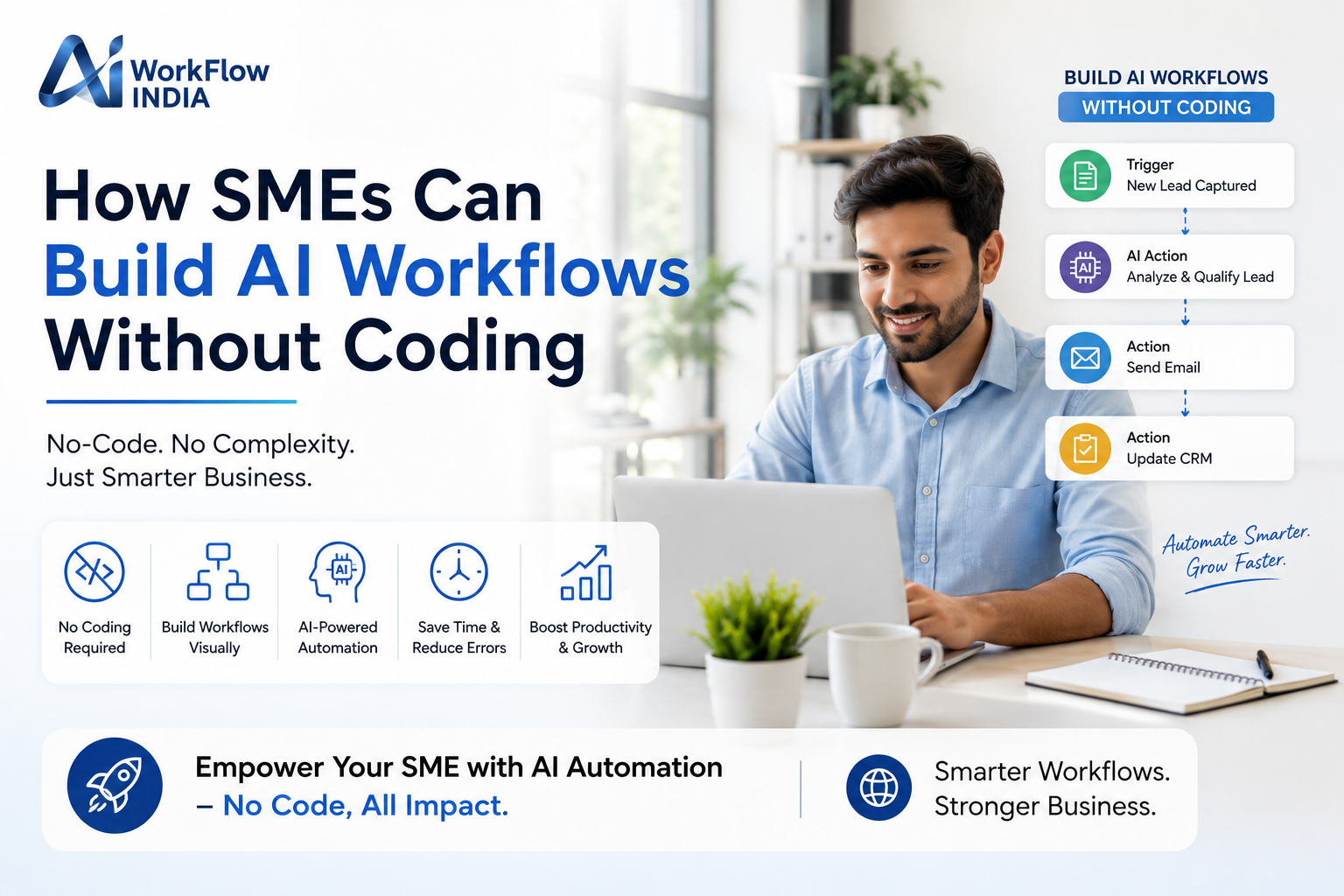
Before you start building, it helps to understand what an AI workflow actually looks like. Simply put, it’s a sequence of automated steps that uses artificial intelligence to complete tasks.
A typical workflow might include:
- Trigger: Something that starts the workflow (a new email, form submission, or scheduled time)
- Data input: Information the AI needs to work with
- AI processing: The intelligent analysis or decision-making step
- Action: What happens based on the AI’s output
For example, imagine a customer sends an email to your support address. The workflow triggers automatically. AI analyzes the message sentiment and topic. Then it routes the email to the right department and suggests a response template. All in seconds, without human intervention.
Common AI Workflow Use Cases for Small Businesses
Not sure where to start? Here are practical examples that SMEs are using right now:
- Customer service automation: Chatbots that answer common questions 24/7
- Invoice processing: Automatically extract data from invoices and enter it into accounting software
- Social media monitoring: Track brand mentions and analyze sentiment across platforms
- Lead qualification: Score incoming leads based on behavior and demographics
- Document analysis: Extract key information from contracts and reports
Top No-Code AI Platforms for Building Business Workflows
The market now offers dozens of no-code automation tools with built-in AI capabilities. Here are some popular options worth exploring:
Zapier with AI Actions
Zapier connects thousands of apps and recently added AI features. You can create workflows that use GPT-powered text generation, data extraction, and intelligent routing. Perfect for SMEs already using multiple cloud tools.
Microsoft Power Automate
If your business uses Microsoft 365, Power Automate integrates seamlessly. Its AI Builder lets you add intelligence to workflows without coding. Create models for form processing, object detection, and sentiment analysis.
Make (formerly Integromat)
Make offers visual workflow building with advanced AI modules. It’s particularly good for complex automations that need conditional logic and multiple branches.
Bubble and AppGyver
For SMEs wanting to build complete AI-powered applications, these platforms offer full app development without code. Create custom dashboards, customer portals, and internal tools.
Step-by-Step Guide to Building Your First AI Workflow
Ready to get started? Follow this practical roadmap to create your first intelligent business automation.
Step 1: Identify a Repetitive Process
Look for tasks your team does repeatedly. Good candidates involve:
- Data entry or transfer between systems
- Sorting or categorizing information
- Responding to common requests
- Generating routine reports
Start small. Pick something that takes 30 minutes to an hour each week. Once you succeed, you’ll build confidence to tackle bigger projects.
Step 2: Map Out the Current Process
Document exactly how the task works today. Write down each step, decision point, and outcome. This becomes your blueprint for the automated version.
Ask yourself:
- What triggers this task?
- What information is needed?
- What decisions get made along the way?
- What’s the final output or action?
Step 3: Choose Your Platform
Select a no-code AI platform that fits your needs and budget. Most offer free trials or free tiers for small-scale use. Consider what tools you already use and look for native integrations.
Step 4: Build and Test
Use the visual builder to create your workflow. Connect your apps, add AI components, and set up your logic. Then test thoroughly with sample data before going live.
Pro tip: Start with a few test cases and watch the workflow run. Check each step to make sure results match your expectations.
Step 5: Monitor and Improve
After launch, keep an eye on performance. Most platforms offer analytics showing success rates, processing times, and errors. Use this data to refine and optimize over time.
Getting Your Team Ready for AI-Powered Automation
Technology is only part of the equation. Your team needs the right skills and mindset to make AI workflow automation successful.
This doesn’t mean everyone needs to become a technical expert. But they should understand:
- What AI can and cannot do
- How to identify automation opportunities
- Basic workflow design principles
- How to monitor and troubleshoot automations
Many companies find that investing in corporate AI training programs accelerates adoption and delivers better results. When employees understand AI fundamentals, they become innovation drivers rather than passive users.
Consider organizing workshops where teams can experiment with no-code tools together. Hands-on practice builds confidence faster than theoretical learning.
Overcoming Common Challenges SMEs Face
Let’s be honest. Implementing new technology isn’t always smooth sailing. Here are obstacles you might encounter and how to handle them.
Challenge: Data Quality Issues
AI workflows depend on good data. If your information is messy, inconsistent, or incomplete, results will suffer. Before building automations, clean up your data sources and establish standards for future entries.
Challenge: Integration Limitations
Sometimes your existing software doesn’t connect easily with no-code platforms. Look for tools with APIs or use middleware solutions. Many platforms also support webhook connections for custom integrations.
Challenge: Employee Resistance
Some team members might worry that automation will replace their jobs. Address this directly. Explain that AI handles repetitive tasks so people can focus on higher-value work. Involve employees in the design process to build ownership.
Challenge: Security Concerns
Any time data moves between systems, security matters. Choose platforms with strong encryption, compliance certifications, and clear data handling policies. Review permissions carefully and limit access to sensitive workflows.
Measuring the Impact of Your AI Workflows
How do you know if your no-code AI initiatives are actually working? Track these key metrics:
- Time saved: How many hours per week does the automation free up?
- Error reduction: Are mistakes decreasing compared to manual processes?
- Speed improvements: How much faster are tasks completed?
- Cost impact: What’s the ROI when you factor in platform costs?
- Employee satisfaction: Is the team happier without tedious manual work?
Create a simple dashboard to monitor these numbers. Celebrate wins and share success stories across your organization. This builds momentum for future automation projects.
Future-Proofing Your SME with AI Capabilities
The businesses that thrive tomorrow are building AI capabilities today. Even simple automations create competitive advantages by freeing resources, improving consistency, and enabling faster decisions.
Start where you are. Use the tools available. Learn as you go. Every workflow you build teaches you something new about your business and what’s possible.
Remember, the goal isn’t to automate everything overnight. It’s to gradually transform operations, one workflow at a time. The cumulative effect over months and years can be transformational.
Your competitors are exploring these technologies right now. The question isn’t whether to adopt AI-powered business automation, but how quickly you can start capturing its benefits.
Take the first step today. Pick one process, choose a platform, and build your first workflow. You might be surprised how quickly things change from there.
Frequently Asked Questions
Do I need technical skills to use no-code AI platforms?
No, you don’t need programming knowledge. These platforms use visual interfaces with drag-and-drop components. If you can use spreadsheets and basic business software, you can build AI workflows. Most platforms also offer tutorials and templates to help beginners get started quickly.
How much do no-code AI tools typically cost for small businesses?
Pricing varies widely. Many platforms offer free tiers suitable for testing and small-scale use. Paid plans typically range from $20 to $200 per month for SME-level features. Compare costs against the time saved and productivity gains to evaluate true value.
What types of AI workflows deliver the fastest ROI for SMEs?
Customer service automation, document processing, and lead management workflows often show quick returns. Focus on processes that consume significant employee time, involve repetitive decisions, and happen frequently. These characteristics maximize the impact of automation.
“`
—
**For Rank Math Meta Post:**
**Title:** How SMEs Can Build AI Workflows Without Coding | No-Code AI Guide
**Meta Description:** Learn how SMEs can build powerful AI workflows without coding. Discover no-code AI platforms, step-by-step guidance, and practical automation tips for small businesses.
**Meta Keywords:** no-code AI, AI workflows, business automation, no-code automation tools, AI for small business, workflow automation, AI-powered automation, SME digital transformation